- Published on
Executing ComfyUI Workflows as Standalone Scripts
- Authors
- Name
- Rob@BitWise
- @BitWise_0x

Introduction
I have been using ComfyUI extensively for programmatic generative workflows. It is genuinely one of the best tools in the diffusion model ecosystem for prototyping pipelines. The drag-and-drop graph-based interface makes it easy to experiment with different text encodings, generation parameters, and postprocessing steps. It has deservedly become the power user tool of choice in the developer community.
But when it came time to deploy workflows as part of a headless processing pipeline, I hit a wall. ComfyUI's architecture couples the workflow execution engine tightly to its web server and frontend. There is no clean way to say "here is a workflow JSON, execute it and give me the output" without spinning up the full server stack. This adds unnecessary setup overhead and makes integration with batch processing or orchestration tools significantly harder.
I explored various alternatives, including ComfyUI-to-Python-Extension, which converts workflows to Python scripts. But this requires an intermediate conversion step that breaks down for dynamic workflows where parameters change between runs. What I needed was a way to execute the workflow API JSON directly, the same format ComfyUI's own server uses internally.
After a couple of hours digging through ComfyUI's internals, I pieced together a standalone executor that bypasses the server entirely. This post walks through that solution: how ComfyUI represents workflows internally, what its execution engine does under the hood, and the minimal code needed to run workflows as standalone Python scripts.
Prerequisites
Refer to the ComfyUI Github page for more information on how to install and run the ComfyUI server. The server makes it easy to create and prototype workflows, and I will also be using it to generate the Workflow API JSON file that we will use to run the workflow as a standalone script.
As part of this post, I will also be referencing the SDXL Turbo workflow which you can find over here. If you wish to follow along, you can download the model from the official SDXL Turbo Repository and place it in the models/checkpoints directory.
IMPORTANT
This solution works by importing ComfyUI's internal modules directly (nodes, comfy_execution, execution). These are not pip-installable packages. You need to run the script from within the ComfyUI directory or add it to your Python path.
Understanding the Workflow JSON Format
When working with ComfyUI, it's crucial to understand the two different JSON formats used to represent workflows.
Workflow.json (Frontend Format)
This is probably the more widely used and recognised format. It is required to layout the graph editor in ComfyUI frontend user interface for visual representation and editing of workflows.
Key characteristics:
- Contains node positions, links, and visual metadata
- Each node has a unique visual identifier, often numeric (e.g., "1", "2", "3")
- Links between nodes are represented as explicit connections
- Follows the Litegraph format, which is designed for graph visualization and manipulation
Here's an example of what the workflow.json format looks like:
{
  "nodes": [
    {
      "id": 7,
      "type": "CLIPTextEncode",
      "pos": [352, 176],
      "size": [425.27801513671875, 180.6060791015625],
      "flags": {},
      "order": 5,
      "mode": 0,
      "inputs": [
        {
          "name": "clip",
          "type": "CLIP",
          "link": 39
        }
      ],
      "outputs": [
        {
          "name": "CONDITIONING",
          "type": "CONDITIONING",
          "links": [20],
          "slot_index": 0
        }
      ],
      "properties": {
        "Node name for S&R": "CLIPTextEncode"
      },
      "widgets_values": ["text, watermark"]
    }
  ],
  "links": [
    [18, 14, 0, 13, 3, "SAMPLER"],
    [19, 6, 0, 13, 1, "CONDITIONING"]
  ]
}
Workflow API JSON (Backend Format)
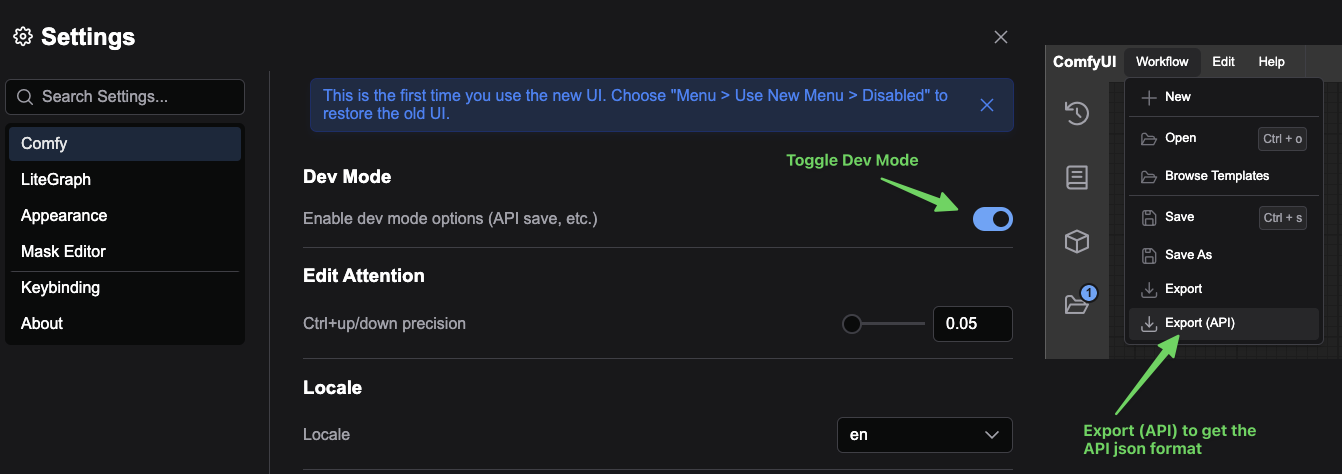
The workflow API JSON can be accessed by switching to dev mode and exporting the workflow as an API JSON. Internally, it is also used in the execution of a workflow.
Key characteristics:
- Provides a more compact representation optimized for execution
- Eliminates visual/UI-specific metadata such as node positions and sizes
- Links between nodes are embedded directly within the node inputs
- Each node is identified by a unique key (e.g., "5", "6", "7")
{
  "7": {
    "inputs": {
      "text": "text, watermark",
      "clip": ["20", 1]
    },
    "class_type": "CLIPTextEncode",
    "_meta": {
      "title": "CLIP Text Encode (Prompt)"
    }
  },
  "20": {
    "inputs": {
      "ckpt_name": "sd_xl_turbo_1.0_fp16.safetensors"
    },
    "class_type": "CheckpointLoaderSimple",
    "_meta": {
      "title": "Load Checkpoint"
    }
  }
}
The workflow API JSON format serves as the foundation for executing workflows programmatically, as it contains all the necessary information about nodes, their inputs, and the connections between them. Take a closer look at the inputs for node "7" of type "CLIPTextEncode" and you will see that the inputs contain properties taken from widgets_values in the original Workflow.json file as well as any associated links. In this example ([20, 1]), the field clip is linked to node "20" and the 2nd input slot.1
Creating a Standalone Execution Script
The key insight from reading ComfyUI's source is that its execution engine is actually quite modular. The coupling to the web server is more about convenience than necessity. The server essentially validates the workflow JSON, builds an execution graph, iterates through it node by node, and caches the results. None of that requires a web server.
The standalone executor consists of two main components, WorkflowExecutor and ExecutionCache, which together replicate what the server does when you click "Queue Prompt":
WorkflowExecutor
The WorkflowExecutor orchestrates the execution of a ComfyUI workflow. In the execute method, it first validates the workflow JSON using ComfyUI's validate_prompt function before constructing it as a DynamicPrompt that gets converted to an ExecutionList. It then iterates over the ExecutionList and executes each node using the _execute_node method, which relies on ComfyUI's get_input_data to retrieve input data for each node and passes it to get_output_data for execution.2
ExecutionCache
I initially tried running without caching, and model loading added 20+ seconds to every execution. ComfyUI's HierarchicalCache handles this well. Once a checkpoint is loaded, subsequent runs reuse the cached model objects. The ExecutionCache wrapper provides a cleaner interface over ComfyUI's three separate cache layers: node outputs, UI data, and object instances.
Combining the WorkflowExecutor and ExecutionCache provides a relatively minimal reimplementation of ComfyUI's execution logic while maintaining as close compatibility as possible.
Full Source Code
import json
import logging
import sys
import torch
from typing import Dict, Any, Optional, List, Set

from nodes import init_extra_nodes, NODE_CLASS_MAPPINGS
from comfy_execution.graph import DynamicPrompt, ExecutionList
from comfy_execution.caching import HierarchicalCache, CacheKeySetInputSignature, CacheKeySetID
from execution import validate_prompt, get_input_data, get_output_data, _map_node_over_list, ExecutionBlocker


def setup_comfyui_env():
    """Setup ComfyUI environment and initialize nodes"""
    logging.basicConfig(
        level=logging.INFO,
        format='%(asctime)s - %(levelname)s - %(message)s',
        datefmt='%Y-%m-%d %H:%M:%S',
        force=True,
        handlers=[
            logging.FileHandler('comfyui_execution.log'),
            logging.StreamHandler(sys.stdout)
        ]
    )
    init_extra_nodes()


class IsChangedCache:
    """Cache for tracking node changes"""
    def __init__(self, dynprompt, outputs_cache):
        self.dynprompt = dynprompt
        self.outputs_cache = outputs_cache
        self.is_changed = {}

    def get(self, node_id: str) -> Any:
        """Get change status for a node"""
        if node_id in self.is_changed:
            return self.is_changed[node_id]

        node = self.dynprompt.get_node(node_id)
        class_type = node["class_type"]
        class_def = NODE_CLASS_MAPPINGS[class_type]

        if not hasattr(class_def, "IS_CHANGED"):
            self.is_changed[node_id] = False
            return False

        if "is_changed" in node:
            self.is_changed[node_id] = node["is_changed"]
            return node["is_changed"]

        input_data_all, _ = get_input_data(node["inputs"], class_def, node_id, None)
        try:
            is_changed = _map_node_over_list(class_def, input_data_all, "IS_CHANGED")
            node["is_changed"] = [None if isinstance(x, ExecutionBlocker) else x for x in is_changed]
        except Exception as e:
            logging.warning(f"WARNING: {e}")
            node["is_changed"] = float("NaN")
        finally:
            self.is_changed[node_id] = node["is_changed"]
            return self.is_changed[node_id]


class ExecutionCache:
    """Cache management for workflow execution"""
    def __init__(self):
        self.outputs = HierarchicalCache(CacheKeySetInputSignature)
        self.ui = HierarchicalCache(CacheKeySetInputSignature)
        self.objects = HierarchicalCache(CacheKeySetID)
        self._caches = [self.outputs, self.ui, self.objects]

    def initialize(self, prompt: Dict, dynamic_prompt: DynamicPrompt) -> None:
        """Initialize all caches with the prompt"""
        is_changed_cache = IsChangedCache(dynamic_prompt, self.outputs)
        for cache in self._caches:
            cache.set_prompt(dynamic_prompt, set(prompt.keys()), is_changed_cache)
            cache.clean_unused()

    def get_output(self, node_id: str) -> Optional[Any]:
        """Get cached output for a node"""
        return self.outputs.get(node_id)

    def set_output(self, node_id: str, output: Any, ui_data: Optional[Dict] = None) -> None:
        """Set output and UI data for a node"""
        self.outputs.set(node_id, output)
        if ui_data:
            self.ui.set(node_id, {
                "meta": {"node_id": node_id},
                "output": ui_data
            })

    def get_object(self, node_id: str) -> Optional[Any]:
        """Get cached object instance"""
        return self.objects.get(node_id)

    def set_object(self, node_id: str, obj: Any) -> None:
        """Cache object instance"""
        self.objects.set(node_id, obj)


class WorkflowExecutor:
    def __init__(self):
        self.cache = ExecutionCache()
        self.executed: Set[str] = set()
        self.execution_order: List[str] = []

    def _execute_node(self, node_id: str, dynamic_prompt: DynamicPrompt,
                      execution_list: ExecutionList) -> Optional[Any]:
        """Execute a single node in the workflow"""
        if node_id in self.executed:
            return self.cache.get_output(node_id)

        try:
            node = dynamic_prompt.get_node(node_id)
            class_type = node['class_type']
            class_def = NODE_CLASS_MAPPINGS[class_type]

            # Get or create node instance
            node_instance = self.cache.get_object(node_id)
            if node_instance is None:
                node_instance = class_def()
                self.cache.set_object(node_id, node_instance)

            logging.info(f"Executing node {node_id} ({class_type})")

            # Get input data
            input_data_all, missing = get_input_data(
                node['inputs'],
                class_def,
                node_id,
                self.cache.outputs,
                dynprompt=dynamic_prompt,
                extra_data={}
            )

            # Handle lazy inputs
            if hasattr(node_instance, "check_lazy_status"):
                required_inputs = _map_node_over_list(
                    node_instance, input_data_all, "check_lazy_status", allow_interrupt=True
                )
                required_inputs = set(sum([r for r in required_inputs if isinstance(r, list)], []))
                required_inputs = [x for x in required_inputs if isinstance(x, str) and (
                    x not in input_data_all or x in missing
                )]
                if required_inputs:
                    for input_name in required_inputs:
                        execution_list.make_input_strong_link(node_id, input_name)
                    return None

            # Execute node function
            output_data, ui_data, has_subgraph = get_output_data(
                node_instance,
                input_data_all,
                execution_block_cb=None
            )

            if has_subgraph:
                raise ValueError("Subgraph execution not supported in standalone mode")

            # Cache results
            self.cache.set_output(node_id, output_data, ui_data)
            logging.info(f"Executed node {node_id} ({class_type})")
            return output_data

        except Exception as ex:
            logging.error(f"Error executing node {node_id} ({class_type}): {str(ex)}")
            raise

    def execute(self, workflow_json: str | dict) -> Dict[str, Any]:
        """Execute a complete workflow from JSON"""
        prompt = json.loads(workflow_json) if isinstance(workflow_json, str) else workflow_json

        # Validate workflow
        valid, error, outputs, _ = validate_prompt(prompt)
        if not valid:
            raise ValueError(f"Invalid workflow: {error['message']}\n{error['details']}")
        if not outputs:
            raise ValueError("No output nodes found in workflow")

        # Initialize execution
        dynamic_prompt = DynamicPrompt(prompt)
        self.cache.initialize(prompt, dynamic_prompt)
        execution_list = ExecutionList(dynamic_prompt, self.cache.outputs)

        # Add output nodes to execution list
        for node_id in outputs:
            execution_list.add_node(node_id)

        # Execute workflow
        with torch.inference_mode():
            while not execution_list.is_empty():
                node_id, error, _ = execution_list.stage_node_execution()
                if error:
                    raise RuntimeError(f"Execution error: {error['exception_message']}")

                output = self._execute_node(node_id, dynamic_prompt, execution_list)
                if output is None:
                    execution_list.unstage_node_execution()
                else:
                    if node_id not in self.executed:
                        self.execution_order.append(node_id)
                        self.executed.add(node_id)
                    execution_list.complete_node_execution()

        return {
            'outputs': self.cache.outputs.recursive_debug_dump(),
            'executed_nodes': self.execution_order
        }


def execute_workflow(workflow_json: str | dict) -> Dict[str, Any]:
    """Helper function to execute a workflow"""
    executor = WorkflowExecutor()
    return executor.execute(workflow_json)
Demo: Executing the SDXL Turbo Workflow
Now that we have a standalone execution script ready, let's walk through the process of converting the SD Turbo workflow into a standalone execution script.
First, we need to convert the SD Turbo workflow to the API format. You can do this from the user interface in dev mode by exporting the workflow as an API JSON from ComfyUI and saving it as sdxl_workflow_api.json.
Next, we will create a Python script that reads the workflow JSON, executes the workflow, and prints the executed nodes. Here is a simple example of how you can execute the SDXL Turbo workflow using the standalone execution script:
if __name__ == "__main__":
    setup_comfyui_env()

    workflow_path = "./user/default/workflows/sdxl_workflow_api.json"

    with open(workflow_path) as json_data:
        workflow_json = json.load(json_data)

    results = execute_workflow(workflow_json)
    print("Workflow executed successfully")
    print("Executed nodes: %s", results['executed_nodes'])
If all goes well, you should be able to get a generated image in the output directory!

Lessons Learned
A few gotchas I ran into while building this that are worth calling out.
The Two JSON Formats Will Trip You Up
The distinction between workflow.json (frontend/Litegraph format) and the Workflow API JSON (backend/execution format) is not well documented anywhere in ComfyUI's codebase. I initially tried to execute the frontend format and spent time debugging cryptic validation errors before realising the execution engine expects a completely different structure.
WARNING
The workflow JSON you get from dragging and dropping a .png with embedded metadata is the frontend format, not the API format. You must explicitly export via dev mode to get the executable API format.
Model Path Resolution
ComfyUI resolves model paths relative to its own directory structure. When running standalone, you need to ensure your working directory is the ComfyUI root, or model loading will fail with path-not-found errors. This tripped me up initially since I was running the script from a different directory.
TIP
Run os.chdir('/path/to/ComfyUI') at the top of your script, or set the working directory before calling setup_comfyui_env().
Subgraph Execution
The standalone executor deliberately raises an error if a node returns a subgraph. In practice, this means certain custom nodes that dynamically create sub-workflows will not work. For the standard ComfyUI node set this is not an issue, but it is worth knowing if you rely on advanced custom nodes.
What's Next
The standalone executor covers the core use case of running a known workflow without the server overhead, but there are several directions I am considering:
- Dynamic workflow composition: Building workflows programmatically in Python rather than designing them in the GUI, then executing them through the same pipeline. The Workflow API JSON format is simple enough that generating it from code is straightforward.
- Batch processing: Iterating over a set of prompts or parameter variations and executing the workflow for each, which was the primary use case that motivated this work.
- Orchestration integration: Wrapping the executor in a task queue or subprocess pool for parallel workflow execution across multiple GPUs.
The ComfyUI codebase is not designed for this kind of usage, and I expect the internal APIs to shift as the project evolves. But for now, the executor handles the standard node set reliably, and the caching layer means repeated executions with the same checkpoint are fast after the initial model load.
Footnotes
While it is also possible to write a script to convert the
Workflow.jsonprogrammatically, there are some challenges in doing so, since a lot of the logic is tied to the ComfyUI frontend. For simplicity, I recommend using the API JSON format. ↩get_output_datareturns the execution result, UI related output and additional information on whether there is a subgraph. ↩